 sysette
Sequential Take 5 editor and preset librarian
Sysette reads every program from your Sequential Take 5, keeps them in a searchable library in your browser, and sends them back exactly as they were. It runs in Chrome, Edge or Opera, with nothing to install and nothing uploaded.
Tested on a real Take 5: reading, playing and writing back were all checked on the instrument.
What you can do
- Read one bank or the whole user memory from the Take 5
- Capture the sound you are playing right now, and play any program from the library
- Import and export standard .syx files, Sequential's factory banks included
- Search the library, then send banks back, each program read back and compared before the next
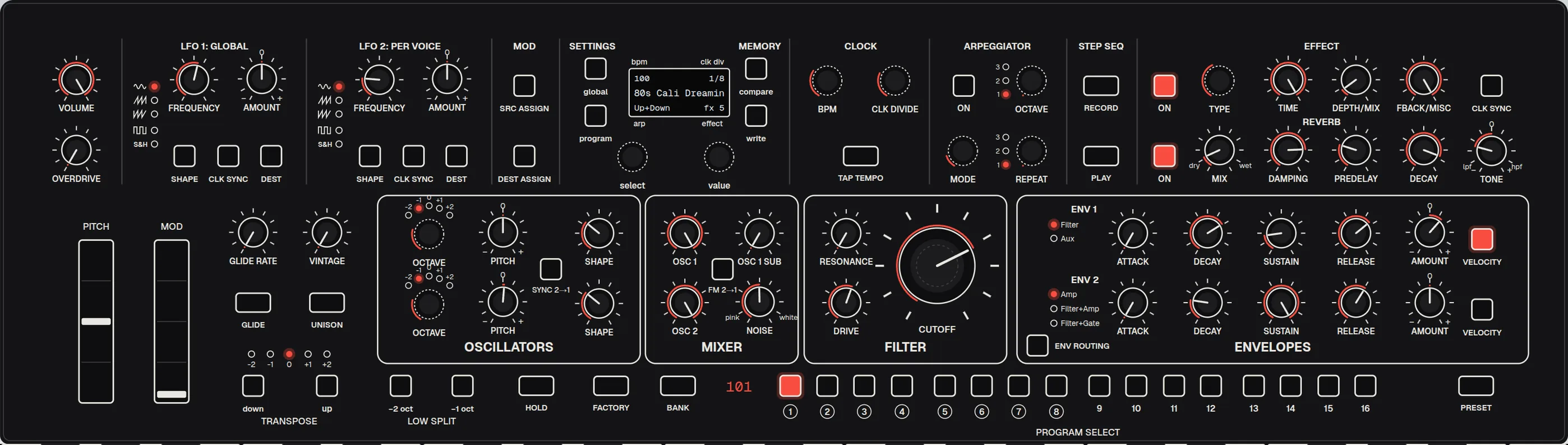
The Take 5 also has the panel: every knob and switch on screen, following the synth as you play. For it, set MIDI Param Receive and Param Send to NRPN in Globals.
How do I back up my Take 5 presets?
- Connect the Take 5 over USB, or over DIN through a MIDI interface.
- Open Sysette, press Connect MIDI and allow MIDI access when the browser asks.
- Read the whole user memory.
- Export it as a .syx file and keep that file anywhere you like.
To restore, import the file and send it back. Sysette lists the locations it will replace before every write, and stops at the first program that does not read back identical.
How big is a full Take 5 backup?
A program is 4,695 bytes on the wire, so 256 user programs make a 1.2 MB .syx file. Over 5-pin DIN at 31,250 baud the data alone takes about 6 minutes.
Take 5 memory
256 user programs, banks U1 to U16 of 16 (101 to 1616). Factory banks are read only on the instrument; Sysette writes to user locations only. Sequential publishes the factory banks as .syx files, and they import as they are.
What a Take 5 SysEx dump looks like
Program dump     F0 01 35 02 <bank> <slot> <4,688 packed bytes> F7
Program request  F0 01 35 05 <bank> <slot> F7
Unpacked, a program is 4,102 bytes, with its 20-character name at offset 195. The dump layout is measured on the real synth and pinned on Sequential's factory banks.
What the Take 5 firmware 2.2 changes for an editor
Sysette's parameter map was measured on a real Take 5 running firmware 2.2.0, all 63 parameters, because the published MIDI Implementation v2 no longer matches it:
- Program bytes do not follow the NRPN order the spec describes, as the factory banks show
- Resonance, LFO frequencies, reverb and FX knobs store 0 to 255
- The arpeggiator block sits one NRPN below the spec, at 162 to 168, and has fifteen modes
The panel follows the synth for free. Editing from the screen comes with the full version, and needs MIDI Param Receive set to NRPN.
Is it free?
The librarian is free. The full version, $29 once, adds renaming, duplicates, arranging memory by drag and drop, and the panel editor where one exists.
Other instruments
Sequential Prophet-6 · Oberheim OB-6 · Sequential Trigon-6 · Sequential Prophet Rev2 · Sequential Pro 3 · Sequential Prophet-5 and Prophet-10 · Oberheim TEO-5
Growing Peas, Lawrenza SRL, RPM Tournai, VAT BE 0747.683.918 · Legal notice
Not affiliated with Sequential. Product names are trademarks of their owners.