Free
The librarian
- Read one bank or the whole memory from the instrument
- A searchable library, kept in your browser
- Import and export standard .syx files
- Send banks back, each program checked on arrival
- The panel view, following the synth live
 sysette
Open the app
Preset librarian for MIDI synths and pedals
Read every preset from your synth or pedal in one go, keep them in a library on your computer, and send them back exactly as they were. It runs in Chrome or Edge, with nothing to install and nothing uploaded.
Open Sysette Free. Plug your instrument in first.
F0 01 35 02 00 00 52 26 65 0C 12 18 5D … F7101Glass choirF0 01 35 02 00 01 0E 36 09 16 6F 6B 11 … F7102Night bus bassF0 01 35 02 00 02 3D 17 6C 0F 1F 39 0F … F7103Tape flutter padF0 01 35 02 00 03 65 0C 38 0B 22 4A 6B … F7104Dusty keysF0 01 35 02 00 04 24 1E 4E 2E 1A 30 5F … F7105Brass stabF0 01 35 02 00 05 18 10 0F 34 7F 6D 50 … F7106Sub droneOn the Take 5
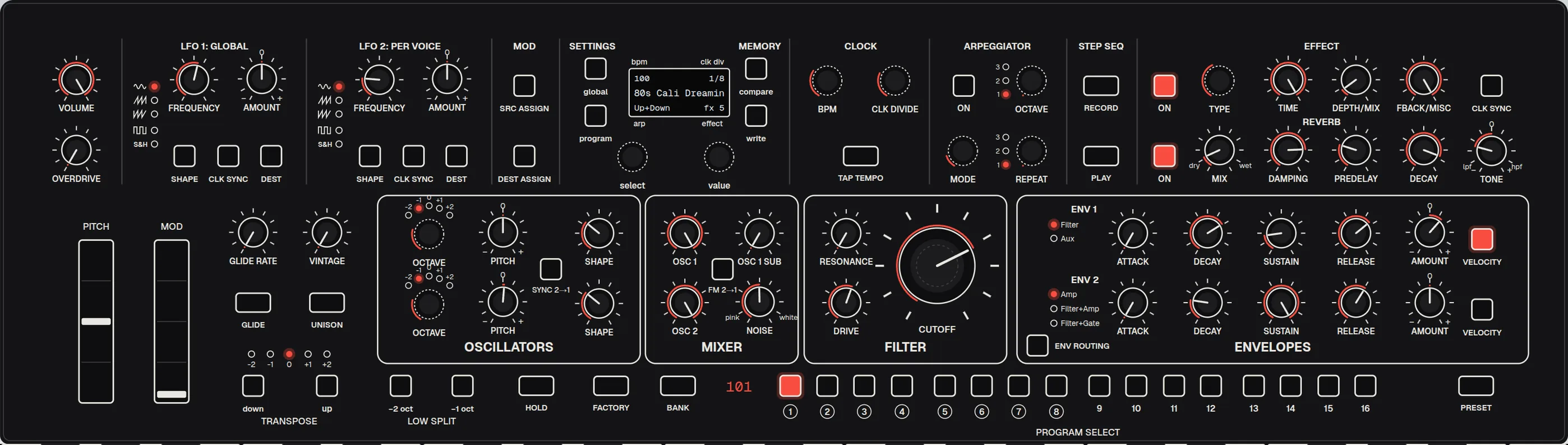
Pick any program and the panel shows where every knob and switch sits. Turn a knob on the synth and the screen follows. Free, like the librarian.
Free
Full version · $29 once
An instrument keeps no undo. Sysette asks before every write and lists the locations it will replace. After each preset goes out, it reads it back and compares it byte for byte before sending the next. One that did not arrive whole stops the run instead of half-writing a bank.
send U16 to Take 5
1601  sent  read back  identical
1602  sent  read back  identical
1603  sent  read back  identical
  ...
1616  sent  read back  identical
16 of 16 verified
The Sequential Take 5, tested on a real unit and with its panel. In beta, checked against the makers' factory banks: the Sequential Prophet-6, Trigon-6, Prophet Rev2, Pro 3 and Prophet-5/10, and the Oberheim OB-6 and TEO-5. Write to [email protected] to ask for yours.
No. Sysette runs in Chrome, Edge or Opera on desktop, which speak MIDI natively. Connect the Take 5 over USB, or over DIN through any MIDI interface, and allow MIDI access when the browser asks.
In your browser only. Nothing is uploaded. Export your banks as .syx files to keep a copy anywhere you like; those files load back into Sysette or into any other SysEx tool.
Sysette asks before every write and lists the locations it will replace. After each program it sends, it reads the program back from the synth and stops at the first one that did not arrive whole.
The panel editor, with every knob and switch on screen and edited live on the synth; the memory plan, to drag programs between the user locations; renaming, duplicating and saving variants; and Calibrate. It is one payment of $29, for good, kept on your account, Google or email, so it follows you to any computer.
No. Sysette is proprietary software and its source code is not published. The librarian is free to use; the full version is a one-time purchase. The public GitHub repository sysette-about holds a description only, no code.
No. Sysette is an independent tool, not affiliated with or endorsed by Sequential. It speaks the SysEx and NRPN messages the Take 5 documents, with parameter ranges measured on a real unit running the 2.2 beta firmware.